Ubuntu 9.04 nedtælling

Nu er der snart ikke længe til Ubuntu 9.04 bliver udgivet. Hvis man har lyst til at hjælpe med at skabe lidt opmærksomhed om udgivelsen så er der nu mulighed for (ligesom ved de sidste udgivelser) at få en countdown banner på sin hjemmeside. Der er følgende fire valgmuligheder:

Ubuntu: For Desktops, Servers, Netbooks and in the cloud

Det kan nævnes at danske Mads Rosendahl står bag kalender banneret.

Hvis du vil have en (eller flere) af ovenstående bannere på din hjemmeside skal du bare indsætte et stykke kode, som du kan finde her: http://www.ubuntu.com/getubuntu/countdown.

Open Source Software conference

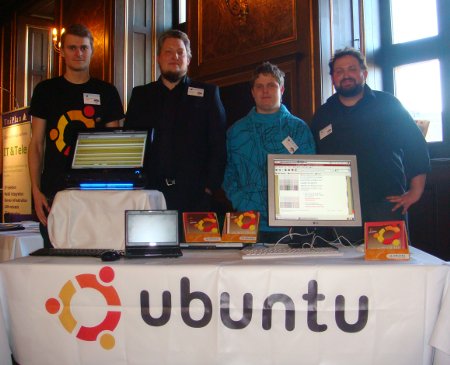
Thursday Michael, Niels and myself represented the Danish Ubuntu community at a conference about open source software in the public sector.
crew
From left to right: Me, Michael, Louis and Niels.

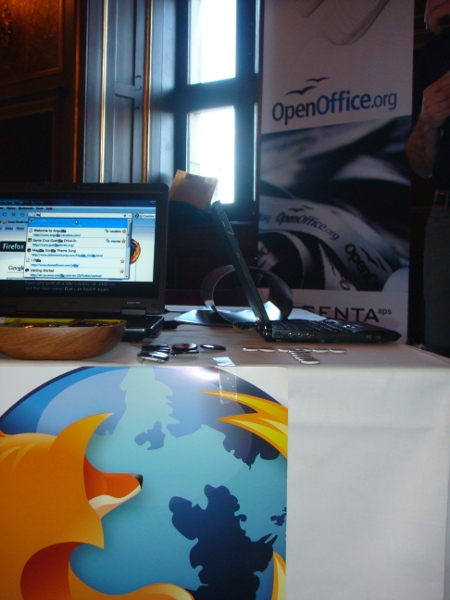
We shared a community booth with the nice people from the Danish OpenOffice.org and Mozilla communities.
community

The conference took place at the historic Børsen.
We handed out all our remaining 8.10 desktop cd’s, got to talk with a lot of people and I believe we managed to convince a few people that Ubuntu (and Linux) has come a long way the last couple of years. Unfortunately I wasn’t quick enough to get a picture when one of the speakers, Christian Lanng, booted his laptop while it was plugged into the projector and revealed that he is in fact running Ubuntu.

You can find resources (presentations etc.) from the conference and discussions of the conference at Digitalisér.dk (in Danish).

Ubuntu vs. Vista… vs. Xenu vs. Colbert

Bryan Quigley gjorde via Planet Ubuntu opmærksom på at det er muligt at komme med bud på hvad det 3. modul på den internationale rumstation, ISS, skal hedde.

iss_after_sts-124_06_2008

Opfordringen i Bryans blogpost var selvfølgelig at stemme på Ubuntu som navn, og som god loyal Ubuntu bruger begav jeg mig straks til siden, men stoppede så op. Det var klart at Ubuntu er at foretrække som navn frem for Vista (som også er på top ti listen i skrivende stund), men Colbert og Xenu er altså også ret gode navne. Mere humoristiske end Unity og Harmony men måske ikke helt så ærværdige – men stadig pokkers sjove!

Jeg skal ikke afsløre hvad jeg endte med at stemme på, men hvis du har lyst til at påvirke hvilket navn det 3. modul på den internationale rumstation får, så er det nu du skal hoppe over til:
http://www.nasa.gov/externalflash/name_ISS/index.html

Conference about Open Source Software

As part of the Danish LoCo Team I have been invited to attend the conference Open source-software i det offentlige (Open Source Software in the public sector) on March 19 in Copenhagen.
oss-konf-stor
The conference is a part of the governments software strategy (as formulated here in Danish) and is hosted by the Videnscenter for Software (the people who run The Software Exchange).
swb

Hopefully we (along with the other open source projects and companies present at the conference) can convince some of the decision-makers and IT professionals in the Danish public sector that Open Source Software is a useful alternative to the current closed source solutions being used throughout the public sector.
In the Danish Team we have been discussing what arguments are best used to convince this audience. Our experience when it comes to advocacy has been mostly with individuals who need an alternative for their machine with Windows and MS Office at home. But what arguments will work best at this conference?
Some of the top selling points we came up with on our mail list seem to be:

  • No malvare (viruses etc.)
  • Low TCO
  • Easy to administrate

There are of course many other advantages of Ubuntu and open source software, but what would be your top three selling points to this audience?

(Links to the conference on Facebook and LinkedIn.)

Nedtællings banner

Hvis du har en lille grafiker gemt i maven har du nu muligheden for at designe det banner (countdown banner) der skal bruges når vi nærmer os udgivelsen af Ubuntu 9.04 (Jaunty Jackalope).

Ved de sidste udgivelser af Ubuntu har der været mulighed for at indsætte en lille banner, der talte ned til udgivelsen på hjemmesider. Her er de bannere der blev brug ved udgivelsen af 8.10:

Du kan se mere information på The Fridge – der også står hvor man skal sende sit forslag hen. Se også denne wiki side.

Kravene til bannerene er:

  • Størrelse: 180px bred og 150px høj
  • Filformat: png, gif eller jpg. Der er også lagt op til muligheden for at have en iframe med html, javascript og noget grafik.
  • Der skal laves 32 bannere i alt. Nedtælling med 1-30 dage tilbage, en “comming soon” og en “it’s here” til når Koalaen endelig er udgivet.

Da der er en måned til bannerne skal tages i brug haster det lidt, så start hellere Gimp nu end i morgen, hvis du har mod på at komme med et forslag.

Karmic Koala

Mark Shuttleworth just announced that Ubuntu 9.10 will have the nick name Karmic Koala

654px-cutest_koala-450
Photo by: Erik K Veland

The focus of the Karmic Koala will be cloud computing on the server side – a technical concept I don’t know much about – and a more polished experience on the desktop, especially faster and more inviting boot and login options. The release mail also hints that maybe (just maybe) the characteristic Ubuntu brown colour will replaced.

Brown has served us well but the Koala is considering other options.

I’m not one of those who have opposed strongly to the brown colour schemes, but after five years of Ubuntu maybe October this year is the right time for a change.

Pictures from Open Source Days 2008

As promised here are pictures of some members of the Danish Ubuntu LoCo team, at the Open Source Days 2008 in Copenhagen. All pictures by Niels Kjøller Hansen.

gruppe-lille
From left to right: Niels, Elge Sander, Søren (me), Mads, Mark and Sakse.

The moose is named after Helge Sander, our Minister of Science, Technology and Innovation. (Elg means moose in Danish.)

The Software Exchange was running the booth with the fancy setup. They work under the Ministry of Science, Technology and Innovation and help the public sector in Denmark choose relevant software, in particular open source software.

Below are some pictures of LoCo team members lounging in front of the portrait of the sabdfl.

gnomonicshiyeesbc

Working webcam

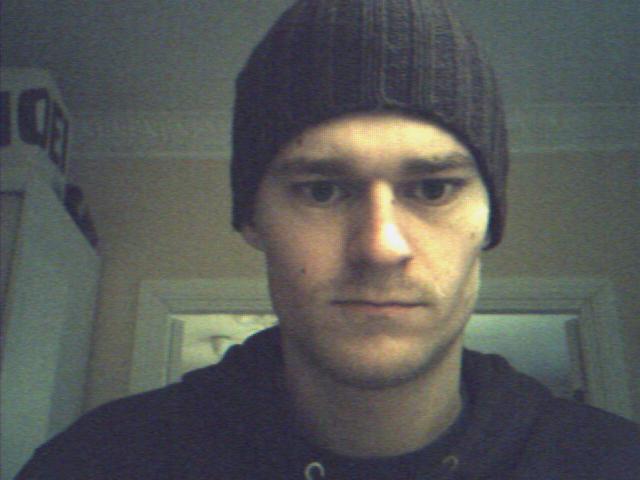
Finally my webcam is working! Up until recently there was no working Linux driver for my webcam, but that seems to have changed.

Reports indicate that the driver is included in the Linux kernel from version 2.6.28. Until that version hits your system (should ship with Ubuntu Jaunty) installing the driver is still possible. See this guide:

http://m560x-driver.wiki.sourceforge.net/testing_m5602

The webcam (or the chip to be more accurate) is located in a lot of laptops. The Launchpad Bug report mentions Asus, Acer, Lenovo and Zepto. I have a Zepto 6615WD myself.

To find out if your webcam is a m560x model, open up a terminal and type

lsusb

if you see a line like this:

Bus 005 Device 003: ID 0402:5602 ALi Corp. Video Camera Controller

you are in business. You may have to activate your webcam somehow. On my system there is a button with a camera icon on it that I have to press before the camera turns on.

The quality is a bit grainy and far from the best – hopefully this can be solved as the driver matures.
hue-lille

However me being (and looking) tired in the morning is properly beyond the scope of some webcam driver. (Yes I cheated and used a regular camera for the Get to know a LoCo post a few weeks back.)

Ubuntu on a USB stick

I finally had the chance to play with the usb-creator feature on the Ibex live CD a few days ago. In short the Ubuntu 8.10 Live CD comes with the option to create a USB startup disk or burn the Live CD iso file to a USB stick, to put it differently.

The usb-creator program can be launched from the System -> Administration -> Create a USB starup disk on the Ubuntu 8.10 Live CD
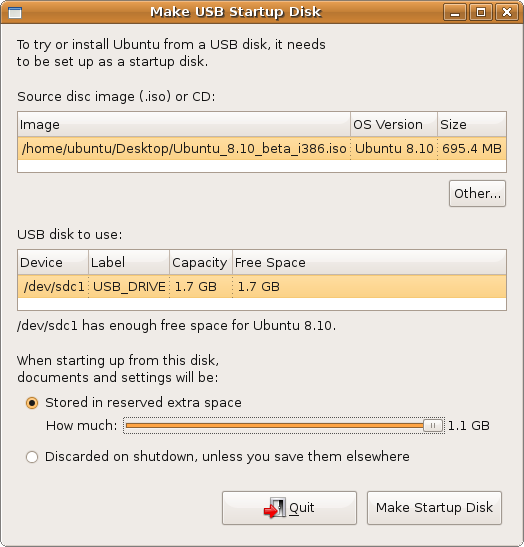
usb-creator

This is a great way to carry around a Ubuntu Linux install, without having to bring my Laptop everywhere. I just need a spare pc with USB boot enabled and I’m good to go, whether I’m trying to show others what Ubuntu can provide or just trying to get some work done. The boot time is of course a bit longer than usual, since everything happens over USB, but once the boot is over you have access to all the fabulous tools that comes with Linux. And if you want you can also install Ubuntu Linux onto the machine you are working on (but don’t do this on other peoples machines without their consent!).

The size of your USB key does limit the fun, both how many extra programs you can install and how many files you can carry around. But with a 4 GB key like mine there is room for the programs I need and can’t seem to find on the Windows machines at work.

It is not all roses though. During install and upgrades I quickly ran into this bug which seems to prevent upgrades of the kernel. Security also seems to be an issue. There is no password needed to log into the system or to use sudo. There is also the risk of forgetting the USB stick – somehow forgetting an entire laptop seems less likely than forgetting a USB key in the USB drive as you get up to leave.
I haven’t yet looked into the possibility of using the private encrypt directory to protect files on the key, but I don’t see why it shouldn’t work on the Live CD.

So, what other uses have you put your Live USB keys to?